Home
Products
Symptom Atlas Signal Vector PDF Compass

PDF Compass app icon
Coming Soon to Google Play

PDF Compass

Get any PDF where it needs to go.

Shrink, split and merge PDFs to fit any upload or email limit, privately, on your Android phone.

An app by Phrax Inc.
Android One-Time Purchase No Account Required No Data Collection Works Offline
Get on Google Play Coming soon See it in action
Scanned document, target 1 MB Real test result
Original 13.8 MB
Result 852 KB
Target 1 MB
Why it exists

Every upload has a limit. Most PDF apps make you guess.

Job portals, school sites, insurance claims and email all cap file size, and the cap is usually lower than the scan you just made. PDF Compass asks for the size you need and works out the rest.

Max file size: 2 MB Upload forms Applications and claim portals that reject your PDF without saying by how much.
Attachment too large Email Messages that bounce, or a report that has to go out in several parts.
12 files, 1 submission Scattered pages Scans and receipts that need to arrive as one tidy document, in the right order.
What it does

Three tools. One size limit.

Everything a PDF needs to get through an upload or an inbox, without a second app.

Shrink Compress to a target size

Type the size you need, such as 2 MB. PDF Compass recompresses the photos and scans inside the PDF until it fits, and keeps them as sharp as that limit allows.

  • Exact targets in KB, MB or GB, instead of low, medium or high
  • Every attempt is listed, so you can see what it tried
  • If a file can't get that small, it tells you why and suggests Split
Split By size or by page

Break a large PDF into the fewest parts that each stay under your limit, or pull out exactly the pages you want.

  • By size: each part fits the limit you set, with no wasted parts
  • Every N pages: 1–10, 11–20 and so on
  • Ranges: 1-5, 8, 12- makes three separate files
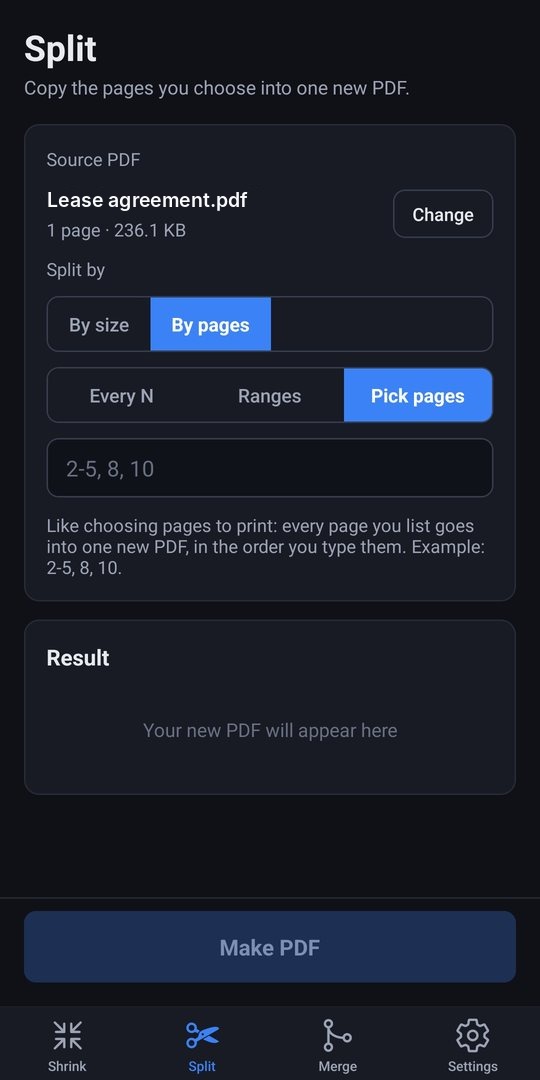
  • Pick pages: 2-5, 8, 10 makes one new PDF, like choosing pages to print
  • Bookmarks and links inside each part keep working

Merge Many files, one PDF

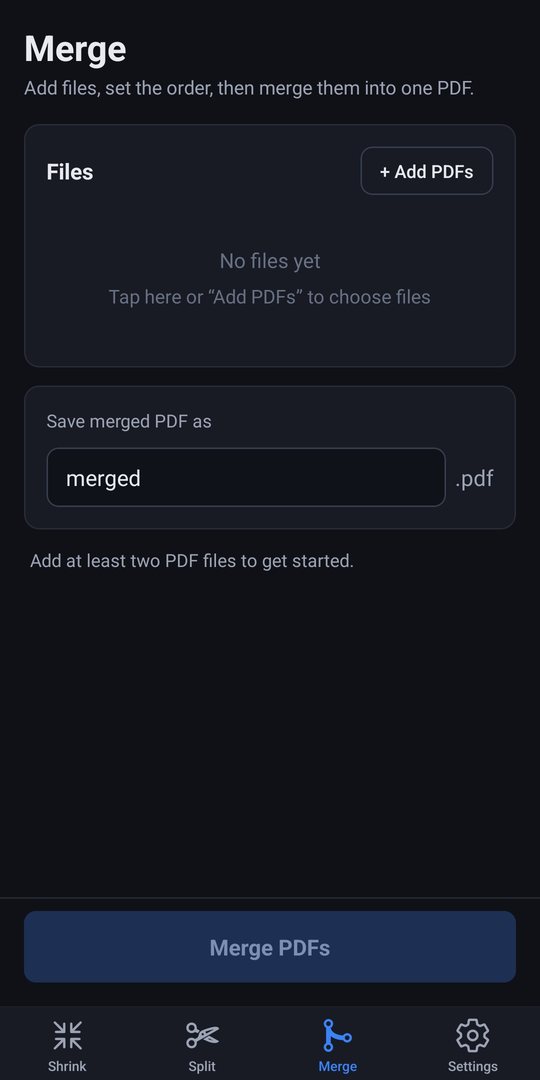
Add PDFs, put them in order and combine them into a single file with the name you choose.

  • Page count and size shown for every file before you merge
  • Bookmarks from each file carry into the merged PDF
  • Protected or damaged files are named in a clear message
How it differs
Typical PDF compressor
Low Medium High

Pick a level, wait, check the size, and try again if it's still too big.

PDF Compass
Under 2 MB

Say the limit once. You get the best-looking file that fits, or a clear reason it can't.

App screens

Every screen, explained

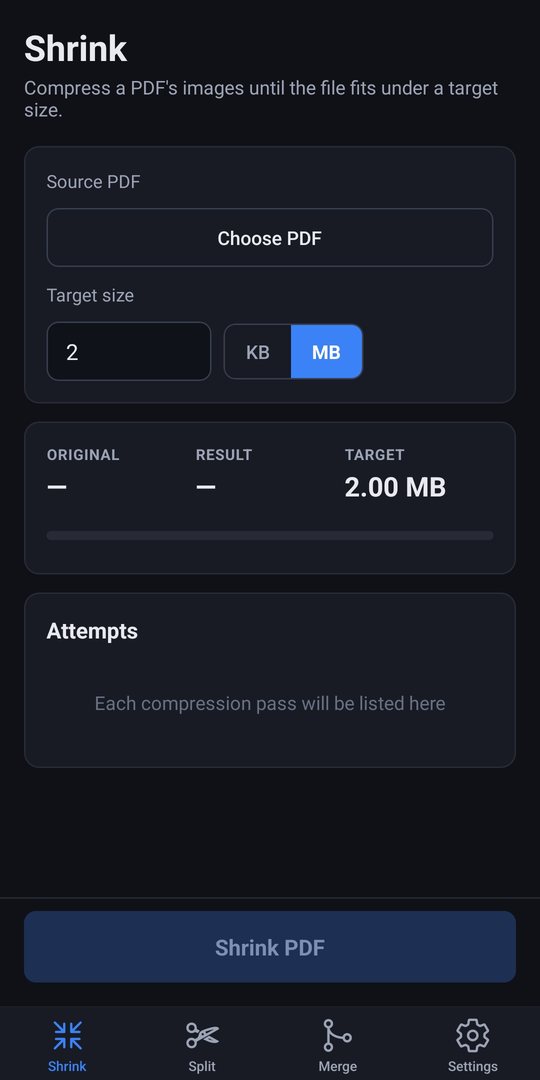
Shrink screen with source PDF, target size, and the Original, Result and Target readout
Shrink

Choose a PDF, type the size you need, and watch each attempt until it fits.

Split screen set to By pages, Pick pages, with a page list box
Split · Pick pages

Split by size, every N pages or ranges, or pick pages into one new PDF.

Merge screen with the file list and output file name
Merge

Add PDFs, set the order with the arrows, name the result and merge.

Screens from the version 1.0 test build · Dark theme

Works with your apps

Straight from your inbox

The PDF that's too big usually just arrived by email. Send it to PDF Compass without hunting for the file.

Share menu Share a PDF to PDF Compass From Gmail, Drive or Files. One PDF asks which tool to use; several go straight to Merge.
Open with Tap a PDF, pick PDF Compass Appears in Android's "Open with" list, and keeps the file's real name.
Save & share Send the result on Save to a folder you choose once, share it to any app, or open it in your PDF viewer. Your original is never changed.
Settings

Everything you can configure

Display Theme Follows your phone, or choose one.
SystemLightDark
Files Save folder Chosen once the first time you save, then remembered. Change it any time.
About Version and licences Version 1.0.0, made by Phrax Inc., with the open-source licences the app is built on.
Private by design

Your documents go nowhere.

Contracts, IDs, medical forms and tax slips are exactly the files people need to shrink. PDF Compass processes them on the device, with nothing uploaded and nothing to sign up for.

Processed on your phone Shrinking, splitting and merging all happen on the device. Files leave the app only when you save, share or open them.
No permissions at all No internet, no storage, no camera. Check it yourself in Settings › Apps › PDF Compass › Permissions: "No permissions requested."
No account Nothing to sign up for, log into or recover. Open the app and use it.
No ads, analytics or tracking One purchase unlocks everything for good. No subscriptions, no tiers and no data collected.
Upcoming updates

What's being worked on

Coming soon

Google Play release

Version 1.0 is complete and tested on Android. Store listing in progress.

Planned

Drag to reorder in Merge

Move files into place by dragging, alongside the up and down arrows.

Planned

iPhone

The app is built to run on both platforms; an iPhone version is planned after Android.

Pricing

One-time purchase. No subscription.

Price at launchGoogle Play

The price will be announced at release. Google Play shows it in your local currency and handles payment and refunds.

Platform Android
iPhone Planned
Version 1.0.0
Status Coming soon
Important

Keep your originals

PDF Compass saves new files and never changes the PDF you started with. Shrinking lowers the quality of the images inside a PDF, and some features such as digital signatures and form fields may not carry over, so keep your original and check each result before you send or submit it.

PDF Compass can't change PDFs that are protected by their creator.